Waterford Early Learning: Historical Reporting
Historical Reporting Preservation makes it easier to review and compare student performance data across school years. Selected reports are automatically preserved within Waterford Early Learning, eliminating the need to manually download and save reports before the end-of-year rollover process.
At the conclusion of a school year, designated reports are preserved within Waterford Early Learning and made available for historical reference. This allows educators and administrators to review prior-year data without maintaining separate report archives.
Current Program Dates
To ensure reports are preserved correctly from year to year:
- Complete the Annual Site Reset as part of your district's year-end process.
- Verify that the Current Program Dates reflect the correct school year dates.
Accurate program dates are required for the preservation of historical reporting data.

Historical reports are preserved as Year-to-Date (YTD) snapshots.
When viewing preserved reports:
- Filters cannot be applied.
- Report data cannot be modified.
- Reports reflect the data captured at the time of preservation.
To view Historical Reports:
- Select the Reports tab.
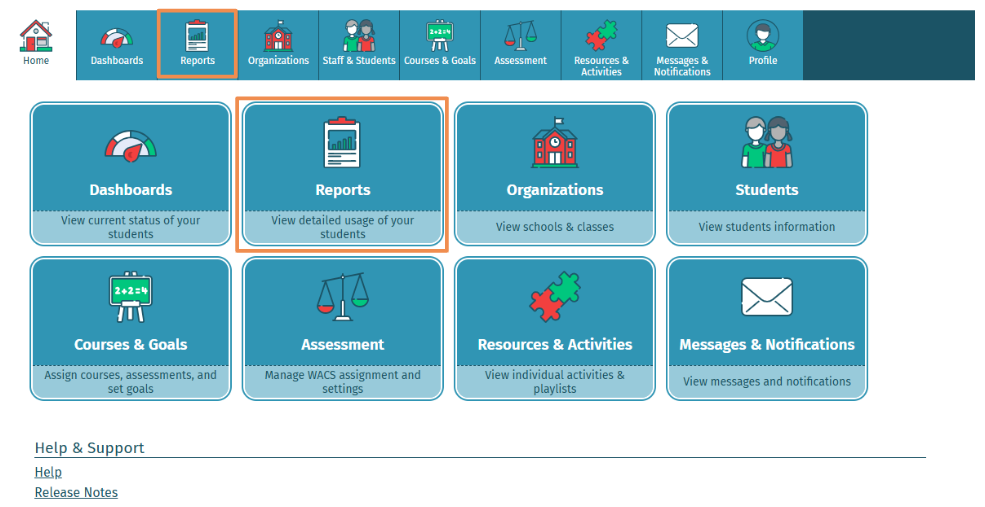
- Filter to the Report you want to view historical reports for.
- The following reports are preserved annually with historical reporting:
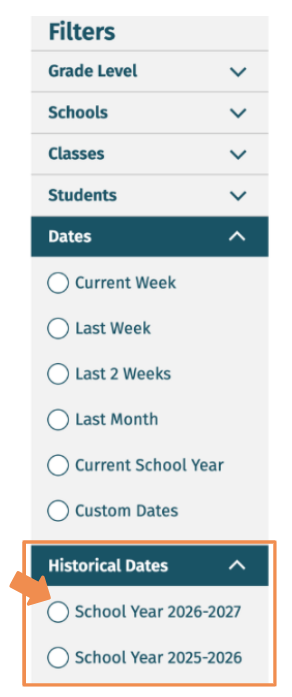
- Under Historical Dates, select the school year you would like to view.
Frequently Asked Questions
- Do reports still need to be saved manually at the end of the year? No. The reports listed above are preserved automatically within WEL and can be accessed later for historical comparison and reference.
- Can historical reports be filtered? No. Preserved reports are stored as Year-to-Date snapshots and are view-only.
- How many years of reports are available? Historical reports are retained for up to five years.
- Why are historical reports not visible for my district? Historical reports are available only after the Annual Site Reset has been completed and the Current Program Dates have been configured correctly for the school year.
Last Updated: 11/11/26

